
Secure Cloud Bookmark Sync for Nextcloud & ownCloud
Overview
The software is a browser extension designed to synchronize bookmarks across devices using ownCloud or Nextcloud platforms. It enables users to access and manage their bookmarks from any location where they have a compatible browser and internet connection. The primary purpose is to maintain a centralized, cloud-based bookmark repository, eliminating the need to manually transfer or back up bookmarks between different devices. This solution is particularly beneficial for individuals and professionals who rely on consistent access to their favorite websites and online resources.
It addresses the common problem of fragmented bookmarks across multiple browsers and devices. By integrating with ownCloud and Nextcloud, the extension leverages established cloud storage infrastructure, ensuring data remains under user control. The target audience includes power users, remote workers, researchers, and anyone managing a large number of bookmarks. The developer did not provide additional background information beyond the software's functionality.
Real-world usage scenarios include academic research where users need to access reference links from different workstations, or professionals managing project-related resources across multiple machines. The extension allows users to organize bookmarks by labels and retrieve them instantly, enhancing workflow continuity and productivity.
Key Features & Capabilities
- Cloud-Based Bookmark Synchronization – Bookmarks are stored and synchronized through ownCloud or Nextcloud, allowing access from any device with internet access and the extension installed.
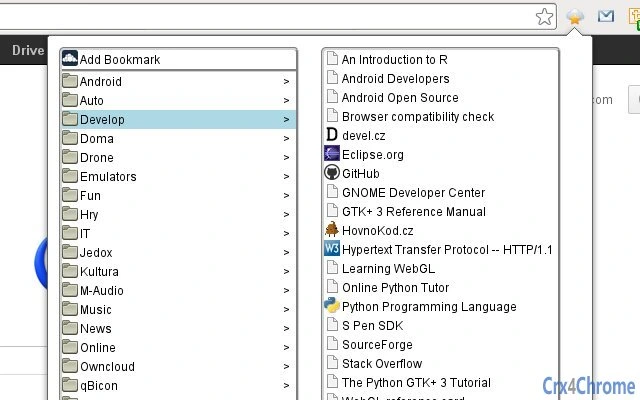
- Label-Based Bookmark Management – Users can organize bookmarks using labels, and clicking on a label displays all associated bookmarks for quick retrieval.
- Multi-Tab Support – The middle-click button opens new tabs without closing the extension, enabling users to open multiple bookmarks in separate tabs while keeping the interface accessible.
- Secure Credential Handling – Username and password must be entered in the extension’s options, and credentials are transmitted via HTTPS to ensure data protection during sync.
- Compatibility with Current Platforms – The extension was tested with Nextcloud 12 and Bookmarks 0.10, and supports current versions of both ownCloud and Nextcloud.
These features streamline the bookmarking workflow by reducing manual effort and improving accessibility. For example, a researcher can label bookmarks by topic, then quickly access all related links during a presentation. A remote worker can use the same set of bookmarks across a home and office computer without duplication or loss.
User Interface, Workflow & Performance
The user interface is designed to be minimal and functional, focusing on core bookmark management tasks. Navigation is straightforward, with a clean layout that allows users to view, organize, and access bookmarks efficiently. The extension integrates directly into the browser toolbar, enabling quick access without disrupting the browsing experience.
Workflow efficiency is enhanced by the label-based system and multi-tab functionality. Users can quickly filter bookmarks by label, reducing search time. The middle-click feature allows for rapid navigation without losing access to the extension’s interface. The developer did not specify resource usage details, and performance observations are based on general software behavior patterns. Stability is expected to be consistent given the extension’s reliance on well-established cloud platforms.
Compatibility & System Requirements
The extension is compatible with Windows, Mac, and Linux operating systems, ensuring broad accessibility across desktop environments. It supports current versions of ownCloud and Nextcloud, with testing confirmed on Nextcloud 12 and Bookmarks 0.10. The installation size is 1.5 MB, which is minimal and suitable for most users.
Exact system requirements were not listed. The developer did not specify minimum hardware specifications or browser versions. Compatibility information is limited to the supported operating systems and cloud platforms. Users are advised to ensure their browser and cloud service are up to date for optimal performance.
Pros and Cons
Pros
- Secure synchronization using HTTPS and user-controlled cloud platforms
- Efficient label-based organization for quick bookmark retrieval
- Supports multiple operating systems: Windows, Mac, and Linux
- Minimal installation size of 1.5 MB
- Free to use with no hidden costs
Cons
- Requires manual entry of credentials in extension settings
- Dependent on external cloud services for data storage
- No information on browser compatibility beyond platform support
- Performance and stability details not publicly available
- Updates may require manual intervention if not auto-synced
FAQ Section
Is this extension compatible with all versions of Nextcloud and ownCloud?
The extension supports current versions of both Nextcloud and ownCloud. It was tested with Nextcloud 12 and Bookmarks 0.10, and is designed to work with recent releases of these platforms.
How are my credentials handled?
Username and password must be entered in the extension’s options. These credentials are sent via HTTPS to authenticate with the cloud service, ensuring secure transmission.
Can I use this extension offline?
The extension requires an active internet connection to sync bookmarks with the cloud. Offline access to previously loaded bookmarks may be possible, but syncing will not occur without connectivity.
Is the software free to use?
Yes, the software is free. There are no subscription fees or hidden charges.
How often does the extension update?
Update frequency is not specified. Users should check for updates manually through their browser’s extension management page.
Final Thoughts
This browser extension offers a practical and secure solution for users who depend on consistent access to their bookmarks across multiple devices. By leveraging the reliability of ownCloud and Nextcloud, it provides a dependable cloud-based bookmark manager without relying on third-party services. The label-based system and multi-tab functionality significantly improve usability and workflow efficiency.
While the lack of detailed system requirements and performance data limits deeper evaluation, the extension’s lightweight design and cross-platform support make it a strong choice for professionals and power users. Its free status and focus on user-controlled data further enhance its appeal.
Download Secure Cloud Bookmark Sync for Nextcloud & ownCloud now.







